Our Products
Powerful tools for data integration and workflow automation.
Two complementary on-premise products that work together to connect your systems, synchronise your data, and automate the workflows that keep your operations running.
Data Synchronisation Studio
Compare, transform, and synchronise your data.
A no-code/low-code desktop integration platform with a set-based comparison engine that reliably reconciles differences and applies changes across any connected system.
- 20+ connectors including SQL, Dynamics 365, Salesforce & SharePoint
- Visual mapping with optional C# extensibility
- On-premise, full control, no cloud dependency
Ouvvi Automation Server
Automate, manage, and monitor your workflows.
A centralised self-hosted scheduling, orchestration, and management platform that gives teams full visibility and control over data integration and operational workflows.
- Time-based & event-driven triggers
- Multi-agent, SQL-backed, extensive logging
- REST API, custom tasks & multi-environment support
Data Synchronisation Studio
Unify, transform, and synchronise your data — without complexity.
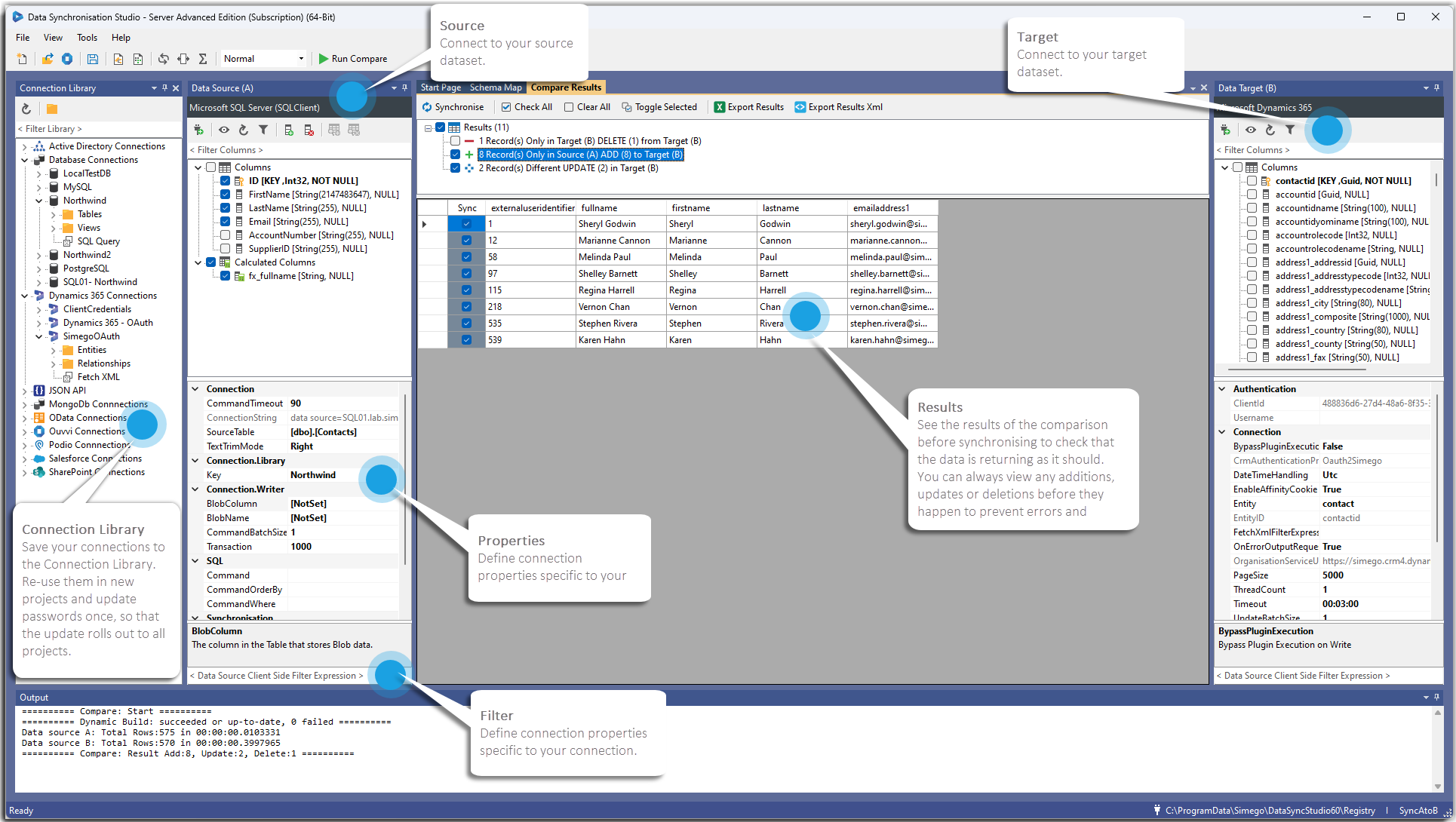
A powerful, flexible data integration platform to connect systems, compare datasets, and synchronise changes reliably at scale — without fragile scripts or complex ETL pipelines.
The problem
Fragmented systems create fragile data operations.
Manual processes and script-heavy integrations increase cost, delay reporting, and raise the risk of inconsistent data.
Siloed systems
CRM, ERP, databases, and cloud apps drift out of sync when there's no reliable, automated process keeping them aligned.
Manual intervention
Hand-run jobs and one-off scripts slow teams down and create hidden operational risk.
Low visibility
Limited preview and logging make troubleshooting difficult and reduce stakeholder trust.
Solution overview
Compare → Transform → Sync
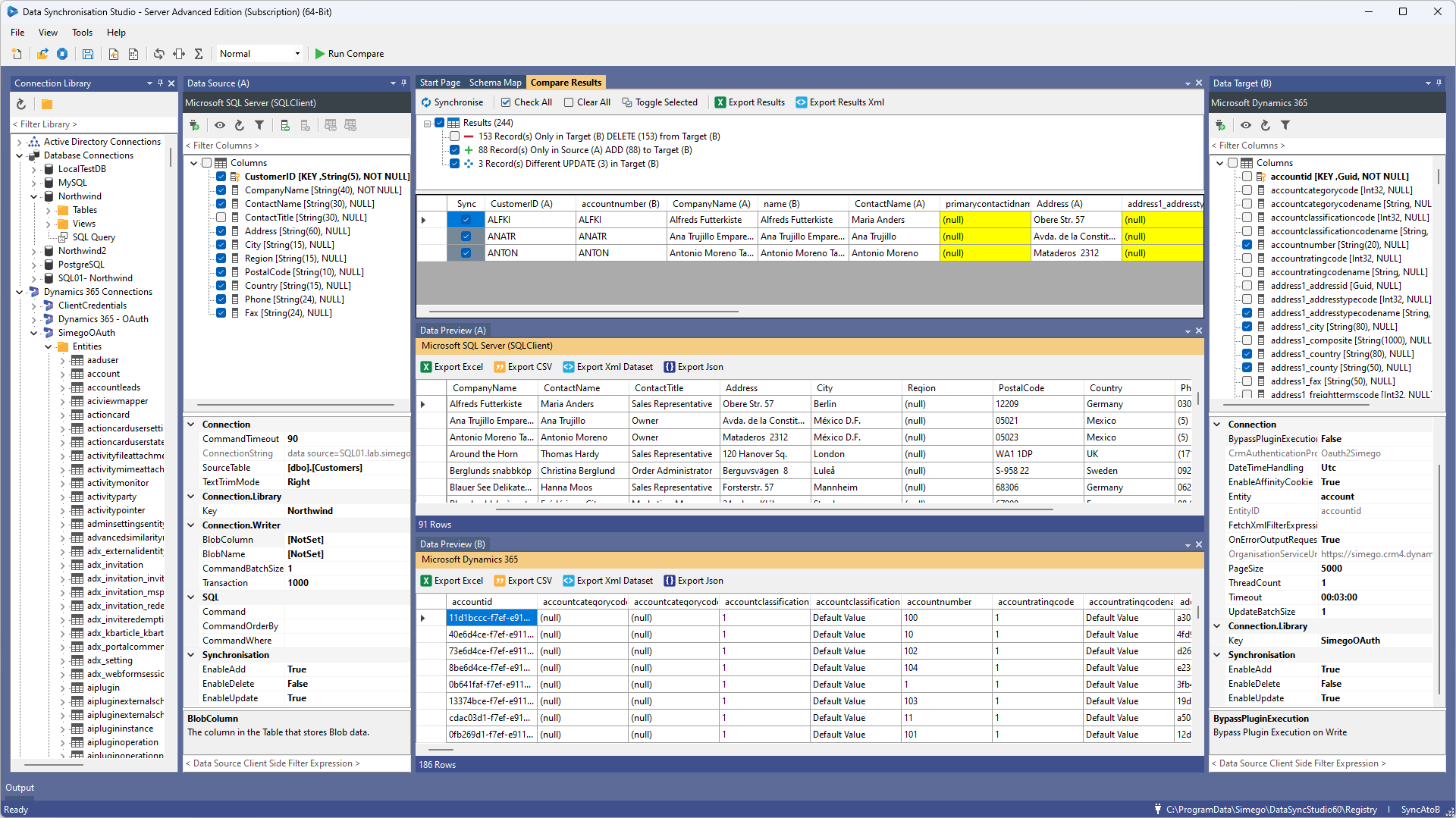
Data Synchronisation Studio compares source and target datasets, generates a deterministic change set, and applies add/update/delete actions with full control.
1. Compare
Rather than relying on event streams or change logs, Data Sync loads both datasets and compares them directly. Reliably detecting what needs to be added, updated, or deleted, even at enterprise scale.
2. Transform
Use calculated columns, dynamic fields, lookups, and optional C# for advanced scenarios.
3. Synchronise
Preview and selectively apply changes, then automate via Run Tool, Ouvvi, or command-line.
Core capabilities
Feature pillars built for scale and control
Set-based sync engine
Loads and compares both datasets to generate a precise changeset. Every add, update and delete accounted for and nothing missed.
No-code + low-code
Visual mapping for business users with optional C# extensibility for developers.
Transformation & enrichment
Calculated columns, lookups, cross-source enrichment, and built-in type conversion.
Preview & control
Inspect source/target/compare output and selectively apply changes before execution.
Connectivity
20+ connectors including SQL, Dynamics 365, Salesforce, SharePoint, plus custom connectors.
Automation & orchestration
Runbooks, scheduling, retry logic, parallel execution, and event/time triggers with Ouvvi.
Monitoring & reporting
Detailed logs, dashboards, and notifications via email.
DevOps-friendly deployment
XML project files, environment configs, and CLI parameterisation for repeatable releases.
Security & governance
On-prem deployment, AES-256 credential encryption, and full control over data flow.
For business leaders
Lower cost. Faster outcomes. Less risk.
- Reduce integration costs by replacing custom scripts and multiple tools.
- Replace slow, error-prone manual exports with automated syncs that keep your systems consistently up to date.
- Know your data is accurate — syncs are deterministic, repeatable, and run automatically without manual intervention.
- Strengthen auditability and compliance with transparent processing.
For technical teams
Unified platform with full extensibility.
- Simplify architecture with one platform for compare, transform, sync, and automation.
- Extend with code where needed — without platform lock-in.
- Automate complex workflows with scheduling and orchestration.
- Debug faster using detailed logs and operational visibility.
Key differentiators
Built differently from event-driven integration tools
Set-based reconciliation
Compares datasets directly rather than relying on event streams or change logs. So you get accurate, consistent results even when upstream events are missed or arrive out of order.
Hybrid no-code + pro-code
Start simple with visual design, then scale to advanced logic with full .NET scripting support.
Local deployment, full ownership
No forced cloud dependency, no runtime limits, and no loss of control over infrastructure or data flow.
Proven at real-world scale
Built and refined over years of production use, handling millions of records efficiently across industries.
Example use cases
Where teams use Data Synchronisation Studio
CRM ↔ ERP synchronisation
Keep customer, product, and order data consistent across platforms without manual exports.
Data migration projects
Move data between systems accurately, with full visibility into what's changing before anything is committed.
Data warehousing / reporting pipelines
Feed clean, consistent data into your warehouse or reporting layer on a reliable schedule.
Master data management
Maintain a single source of truth and push it out to connected systems automatically.
Cloud ↔ on-prem integration
Bridge legacy on-premise systems with modern cloud platforms without losing control of your data.
Data reconciliation
Identify and resolve discrepancies between systems before they cause downstream problems.
Start syncing your data in minutes.
A powerful yet simple data integration platform that combines the ease of no-code with the flexibility of full-code — delivering reliable, scalable data synchronisation without complexity.
Self-hosted · SQL-backed · Multi-agent · Execution logging
Automate, manage, and monitor your data workflows in one platform.
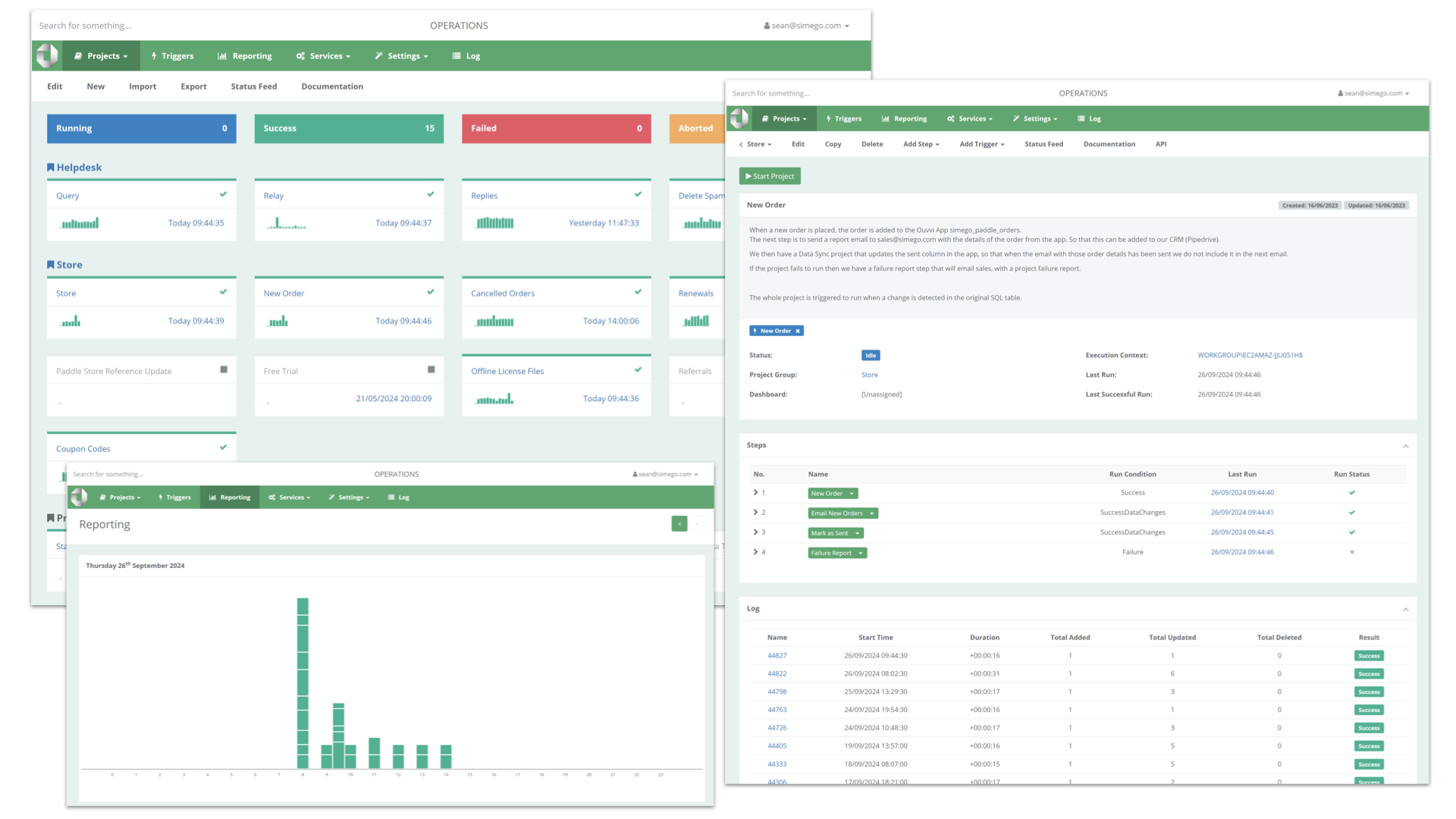
Ouvvi Automation Server is a centralised scheduling, automation, and management platform designed to orchestrate data integration and operational workflows across your organisation with full visibility and control.
Platform overview
Ouvvi Automation Server
Projects
Run parallel workflows with structured task execution.
Steps & Triggers
Combine schedules, events, APIs, and flow control.
Monitoring
Track runs, errors, history, and performance in one place.
Product overview
One platform to automate, orchestrate, and monitor your data operations.
Ouvvi combines a web-based management interface, SQL-backed configuration, and execution agents into a single platform. Giving teams full visibility and control over every workflow, from data syncs to scripts, SQL jobs, and file operations.
Unlike cloud-only tools, Ouvvi is installed on your infrastructure, giving you ownership of data, security, compliance, and performance while still delivering modern automation, scheduling, and monitoring capabilities.
It scales from a single scheduled sync to hundreds of automated jobs running across multiple agents, environments, and teams.
Core value
Why teams choose Ouvvi
Automate repetitive processes
Reduce manual effort across integrations, reporting, and operations.
Centralise monitoring and control
Give teams one dashboard for health, execution, and intervention.
Improve reliability and traceability
Track every run with logs, timelines, and traceable execution history.
Key benefits
Built for reliable automation across the business and the technical team.
Reduce operational risk
Ensure critical processes run consistently, on time, and with less manual dependency.
Gain complete visibility
Monitor health, execution status, trends, failures, and historical performance in one place.
Scale with confidence
Move from simple schedules to parallel, distributed, enterprise-grade workflow automation.
Keep control in-house
Stay on-premise with full ownership of infrastructure, data security, and compliance posture.
Feature highlights
Purpose-built for data integration operations and workflow orchestration.
Workflow orchestration
Projects, steps, and triggers
Use a project-based execution model with sequential task execution, parallel processing, time-based schedules, and external event triggers.
Web management
Centralised browser-based control
Give teams a single dashboard for monitoring, management, remote administration, and role-based multi-user access.
Monitoring & reporting
Real-time visibility
Track dashboards, execution timelines, historical trends, and drill into individual runs and errors for faster diagnosis.
Audit & logging
Execution traceability
Capture detailed execution logs per run, trace events end-to-end, and optionally store changed data for audit and compliance workflows.
Integration flexibility
Run the tools you already use
Execute Data Sync projects, scripts, SQL, PowerShell, external programs, and trigger workflows through the REST API.
Reliability
Built-in resilience
Reduce disruption with retry logic, branching workflows, flow control, and notifications via Email.
Architecture overview
Structured automation with projects, steps, and triggers.
Ouvvi is designed to model and run operational workflows in a clear, repeatable structure so teams can build once, monitor centrally, and scale confidently.
Define projects
Organise work into reusable projects that support parallel processing and cleaner operational boundaries.
Compose workflow steps
Execute tasks sequentially within a workflow while combining scripts, SQL, Data Sync projects, and external programs.
Attach triggers
Start workflows using time-based schedules, queue-based execution, APIs, or external events such as incoming data changes.
Monitor and scale
Use dashboards, logs, agents, and historical reporting to keep workflows reliable across Dev, UAT, and Production.
Management layer
Web dashboard
Centralised monitoring, reporting, role-based access, and workflow control.
Workflow model
Projects & steps
Structured execution pipelines with flow control and branching.
Trigger layer
Schedules & events
Time-based, event-driven, queue-based, and API-initiated execution.
Execution layer
Agents
Distributed processing, load balancing support, and failover-ready architecture.
Data layer
SQL configuration
Centralised configuration, logging, environment settings, and deployment metadata.
Centralised management with structured workflows, reusable configuration, and distributed execution.
Use cases
Automate the workflows that keep operations moving.
Data synchronisation
Sync CRM, ERP, databases, and line-of-business systems.
Scheduled reporting
Run exports, prepare data, and deliver reports on time.
Event-driven pipelines
Respond to system events, API calls, and inbound changes in real time.
IT operations automation
Automate support tasks, scripts, checks, and operational routines.
Cross-system orchestration
Coordinate workflows that span multiple tools, environments, and teams.
Technical capabilities
Extensible for developers. Manageable for operations.
Ouvvi supports structured DevOps workflows, reusable configuration, integration APIs, and deployment across isolated environments without giving up operational control.
Integration flexibility
Run Data Sync projects, SQL, PowerShell, scripts, and external programs from one automation platform.
REST API
Trigger, monitor, and extend workflows through APIs.
Connection & configuration management
Use reusable connections, environment variables, and import/export support to reduce duplication and errors.
Multi-environment support
Promote reliably across Dev, UAT, and Production with isolated environments and controlled deployment workflows.
High availability & scalability
Scale out with multi-agent architecture, distributed processing, load balancing support, and failover configurations.
Ouvvi Apps
Use built-in data storage and API outputs for reporting, exports, staging, and integration with tools like Power BI.
Why Ouvvi
Purpose-built for integration operations
- Designed for data integration operations rather than generic scheduling alone.
- Full visibility and control with logged, traceable execution history.
- Hybrid automation with both scheduled and event-driven workflows.
- Extensible platform via APIs, custom tasks, and external system integration.
Security & deployment
Keep your data and execution environment under your control.
- Installed on your own infrastructure for data sovereignty and internal system access.
- SQL Server-backed configuration for central management and governance.
- No dependency on cloud services and no vendor lock-in for core execution.
- Supports compliance and audit requirements with detailed logs and traceability.
Built for both audiences
Clear value for business stakeholders and technical teams.
Business audience
Reliable automation with lower operational risk
- Reduce manual workload and improve efficiency.
- Gain visibility into critical processes and service health.
- Improve governance with safer releases and environment control.
- Support compliance with detailed logging and full execution traceability.
Technical audience
Scalable workflows with full extensibility
- Build modular workflows with structured orchestration.
- Integrate with any system using APIs, scripts, or custom tasks.
- Deploy across environments with cleaner DevOps promotion paths.
- Diagnose and optimise with full execution traceability.
Get started with Ouvvi
Centralise your automation workflows without giving up control.
See how Ouvvi Automation Server can orchestrate data integration, scheduling, monitoring, and operational workflows across your organisation.