Ouvvi Queue System: Automatic Retries, Failure Recovery and Async Processing
Most Ouvvi users never explore the queue system. Here's how it handles integration failures automatically, recovers from errors without data loss, and frees up your web applications with async processing.
If you use Ouvvi mainly as a job scheduler — set it, forget it, let it run — you'll already be seeing its value. But there's a layer underneath the scheduler that most customers never fully explore: the queue system. This has been running in our own production systems for over a decade, quietly handling failure recovery, throttling, and async processing for integrations that can't afford to miss a beat.
Here's what it does, and why it matters.
When Things Go Wrong: Retry and the Queue Failure Table
Real-world integrations fail for reasons that have nothing to do with your configuration. An email host goes down. A password gets changed. A client secret expires. A network blip interrupts a sync mid-run. Without a retry mechanism, every failure becomes a manual problem: whether that's waiting for a service to recover or tracking down a changed credential. Ouvvi's queue system gives you a clean recovery path for both.
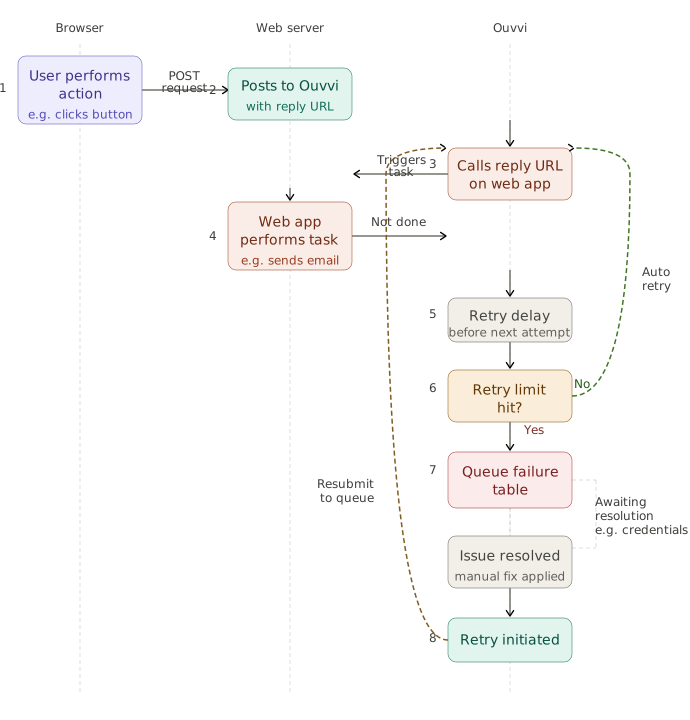
It works at the step level, where you determine how many times a step should retry before it stops trying. For these important steps you'll want to enable Save Failures, as this tells Ouvvi to add the step to the queue failure table if all retries are exhausted. It's not always necessary for Data Sync projects since those can safely be run multiple times, but for other services where you need to replay the exact same step with the same details, it's worth switching on.
This way, if the step exhausts its retries and still can't complete, it doesn't just disappear. It lands in the queue failure table, where it sits waiting for you to act.
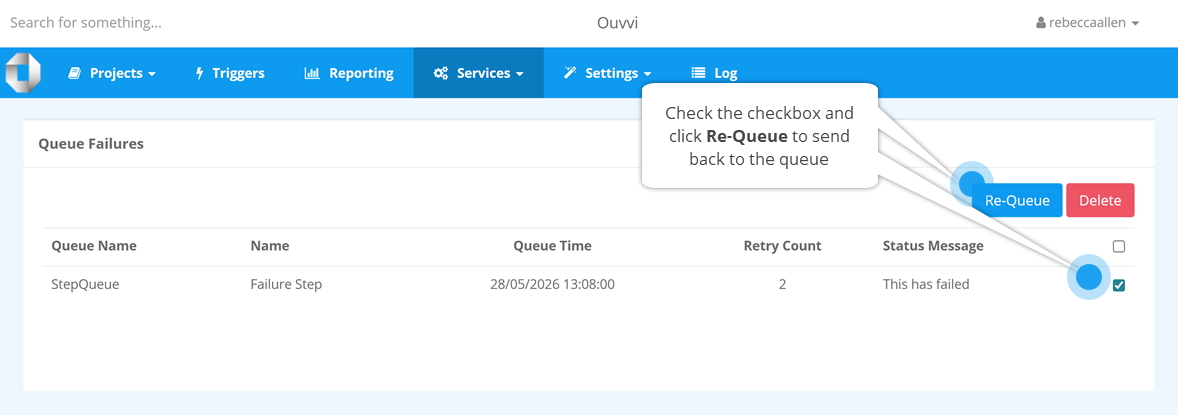
Once you've resolved the underlying issue, whether that's updated credentials or waiting for a host to come back online, you can resubmit the failed step back to the queue. Ouvvi then picks it up and runs it again as if nothing happened.
We use this pattern ourselves for our helpdesk system. If an email can't be sent because the email host is temporarily unavailable, the message goes into the failure table. Once the host recovers, we resubmit it and the email goes out. No data loss, no manual re-entry, no awkward gap in behaviour. Just a clean recovery.
The image below shows the queue failure table, with a failed step ready to be resubmitted.
Beyond Scheduling: Using the Queue for Async Processing
The retry story is probably the most immediately useful thing, but the queue system can also change how you think about integrations that involve external requests or web applications.
The typical problem: your web application fires off a task, such as sending an email or processing a form submission, and the page blocks while it waits for a response. If that task takes a few seconds, your users feel it. If something goes wrong, they see it.
Ouvvi offers a different pattern. Instead of processing the task synchronously, your application posts the request to Ouvvi, which manages the queue and calls back to your web application when ready. The page returns immediately and your users are never left waiting. Your web application handles the actual work, such as sending the email, via a reply URL that Ouvvi calls when it processes the queued item.
We use this exact architecture for our own helpdesk web app. Rather than running a separate background service for every application that needs async processing, everything routes through Ouvvi's queue. One system, centrally managed, handling requests from multiple applications.
The diagram below shows the full flow, including how retries and failures are handled.
Throttling Comes Built In
One practical consequence of using a queue is that you get throttling without having to build it yourself. Ouvvi processes queue items across five threads. If a large volume of work hits the queue at once, say a trigger picks up hundreds of email replies in a short window, Ouvvi works through them at a steady, controlled rate rather than attempting to process everything simultaneously, meaning your downstream systems don't get hammered and your infrastructure doesn't spike.
This is the kind of thing you'd normally have to plan out and engineer how to handle internally. With Ouvvi's queue, it's built in and just how it works.
A Pattern Worth Knowing
Taken together, these capabilities describe a specific architectural pattern: push work onto a queue, let Ouvvi manage execution, handle failures gracefully without losing the task, and process at a rate your systems can sustain.
It's not exotic and it's not new. This architecture has been running in our own production systems for over ten years, so when we say it works under real conditions, we mean it. But it's the kind of thing that only becomes obvious once you've hit the problem it solves: a credential change that took down an integration overnight, a spike in volume that overwhelmed a service, a transient failure that nobody noticed until a customer complained.
If you want to explore the queue and failure table further, the Ouvvi queue documentation walks through the configuration in detail. And if you have questions or want to run through some ideas, feel free to reach out to us.